• Sign Up / Log in
  • Contact
Welcome To Advent 3D
Advent 3D Advent 3D
  • Home
  • Products
    • Post Processing
    • Printers
      • FDM Technology
        • UltiMaker Factor 4
        • UltiMaker S6 3D Printer
        • Sketch Sprint
      • SLA/LFD Technology
        • Form 4
        • Form 4L
      • SLS Technology
        • Fuse 1+ 30W/Fuse Sift
    • Materials
      • UltiMaker Consumables
      • SLA Resins
        • Standard Resin
        • Engineering Resin
        • Medical Resins
        • Jewellery Resins
      • SLS Powder
    • Accessories
      • Build Platforms
      • Finish Kits
      • Form Cure
      • Form Wash
      • Fuse Accessories
      • Resin Tanks
      • UltiMaker Accessories
    • Software
      • Preform
      • Dashboard
  • About Us
    • Events
    • Blog
  • Leasing
  • Contact
  • Shop
  • 1 item£60.00
  • Home
  • Products
    • Post Processing
    • Printers
      • FDM Technology
        • UltiMaker Factor 4
        • UltiMaker S6 3D Printer
        • Sketch Sprint
      • SLA/LFD Technology
        • Form 4
        • Form 4L
      • SLS Technology
        • Fuse 1+ 30W/Fuse Sift
    • Materials
      • UltiMaker Consumables
      • SLA Resins
        • Standard Resin
        • Engineering Resin
        • Medical Resins
        • Jewellery Resins
      • SLS Powder
    • Accessories
      • Build Platforms
      • Finish Kits
      • Form Cure
      • Form Wash
      • Fuse Accessories
      • Resin Tanks
      • UltiMaker Accessories
    • Software
      • Preform
      • Dashboard
  • About Us
    • Events
    • Blog
  • Leasing
  • Contact
  • Shop
  • 1 item£60.00
View cart “Air Manager Replacement Filter” has been added to your cart.
Home / Accessories / UltiMaker Accessories / UltiMaker Factor 4 Print Station

UltiMaker Factor 4 Print Station

0 out of 5

£1,450.00 ex. VAT

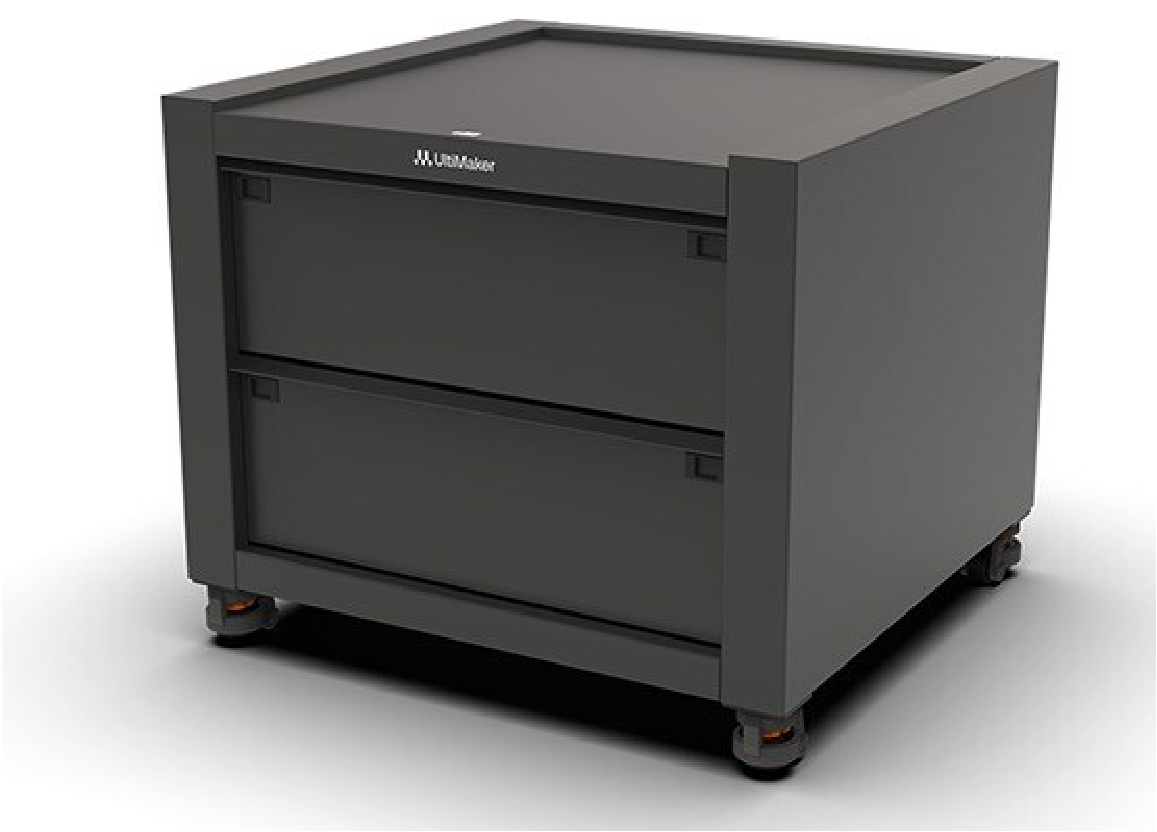
The movable Printer Station provides a sturdy base for the UltiMaker Factor 4. Effortlessly and safely move your 3D printers when necessary, for example for maintenance purposes, which lets you greatly optimize your workspace. Store your materials, tools, and consumables in the Station’s drawers to ensure all you need is always within reach.

Need Any Advice?

Got a question about our products? Find out more by calling us on 44 (0) 1295 672600 or click here to get in touch about any product or service.

SKU: 2ULTI805 Category: UltiMaker Accessories
Share:
Facebook Twitter Pinterest
  • Description

Description

The movable Printer Station provides a sturdy base for the UltiMaker Factor 4. Effortlessly and safely move your 3D printers when necessary, for example for maintenance purposes, which lets you greatly optimize your workspace. Store your materials, tools, and consumables in the Station’s drawers to ensure all you need is always within reach.

Installation

Before proceeding to install a printer on top of the cabinet, place it in a location where you have sufficient space in front of the cabinet to move the printer.

Caution: Ensure all four levelling feet are fully turned down to prevent the cabinet from moving unexpectedly while installing the printer. Due to the size and weight of the printer, the UltiMaker Factor 4 is considered non-portable. Do not attempt to carry the printer, but use proper means to install this product, such as a forklift or similar device. Do not tilt the machine to avoid the printer falling over.

  1. Raise the UltiMaker Factor 4 including the pallet to the height of the Station’s surface.
  2. With at least two people, slide the UltiMaker Factor 4 backward off the pallet and onto the Station.
  3. Rotate the printer’s adjustable feet so that the printer sits perfectly level on the surface.
  4. Secure the printer to the Station using the included bolts.
  5. With the printer securely attached to the Station, fully retract all four of the Printer Station’s levelling feet.

Caution: Always turn all four levelling feet fully up before moving the Station. There is a risk of tipping the printer while moving if the feet are not raised sufficiently.

  1. Move the cabinet with the printer to the desired location.
  2. Lower all (accessible) feet to lock the cabinet in place.

Tip: Ensure all accessible feet are lowered. If multiple cabinets are installed in a row without access to the back, only the feet at the front and side of the row must be lowered.

Operation

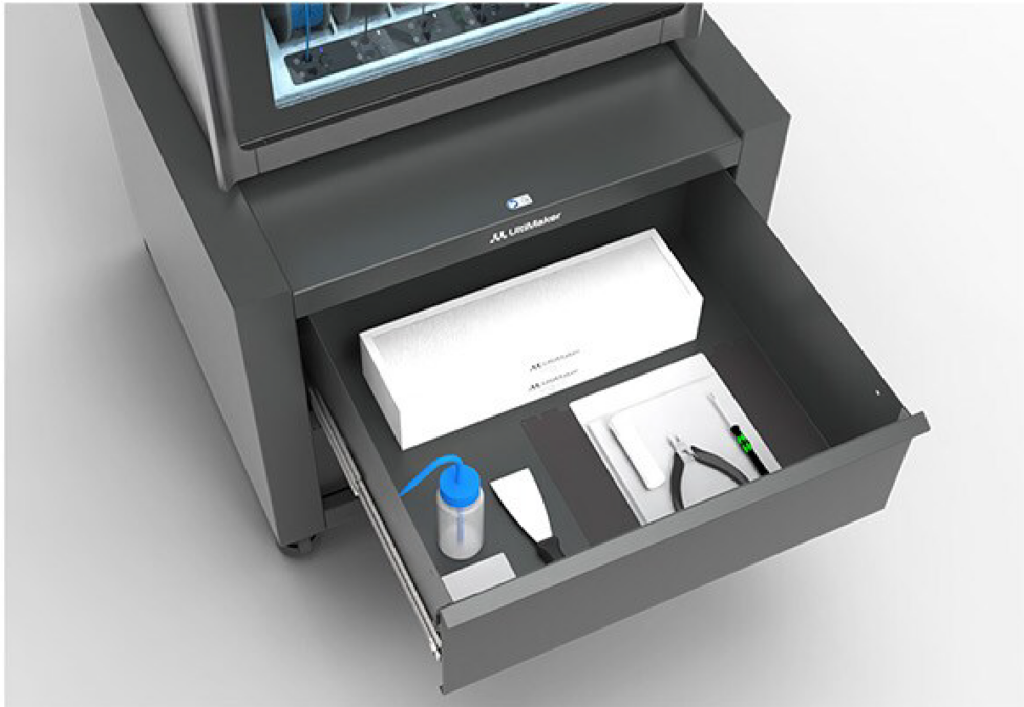
The drawers at the front of the Printer Station can be used to store materials, tools, and consumable items. To open the drawer, press the clips on either side inward and slide out the drawer.

Tip: The Factor 4 Maintenance Kit fits perfectly in the Printer Station’s drawer.

When moving the printer and the Printer Station, unlock the wheels by turning all four of the leveling feet fully upward. You can now easily move the printer and Station to a different location. Please note to re-secure the Station’s position before performing any maintenance or repair actions on the printer.
Related products

  • UltiMaker Print Cores AA-DD

    £135.00 – £469.00 ex. VAT
    0 out of 5
  • UltiMaker Digital Factory

    £500.00 – £4,000.00 ex. VAT
    0 out of 5
  • UltiMaker Cleaning Filament (pack of 10 x 20cm)

    £16.00 ex. VAT
    0 out of 5
    Add to CartView Cart
Privacy Policy / Advent3D © 2026 / All Rights Reserved / Website by White Space Collective
We use cookies on our website to give you the most relevant experience by remembering your preferences and repeat visits. By clicking “Accept All”, you consent to the use of ALL the cookies. However, you may visit "Cookie Settings" to provide a controlled consent.
Cookie SettingsAccept All
Manage consent

Privacy Overview

This website uses cookies to improve your experience while you navigate through the website. Out of these, the cookies that are categorized as necessary are stored on your browser as they are essential for the working of basic functionalities of the website. We also use third-party cookies that help us analyze and understand how you use this website. These cookies will be stored in your browser only with your consent. You also have the option to opt-out of these cookies. But opting out of some of these cookies may affect your browsing experience.
Necessary
Always Enabled
Necessary cookies are absolutely essential for the website to function properly. This category only includes cookies that ensures basic functionalities and security features of the website. These cookies do not store any personal information.
Non-necessary
Any cookies that may not be particularly necessary for the website to function and is used specifically to collect user personal data via analytics, ads, other embedded contents are termed as non-necessary cookies. It is mandatory to procure user consent prior to running these cookies on your website.
SAVE & ACCEPT